
Your live sales are crushing it. Customers show up, they engage, they buy. But the moment you go offline, the momentum stops.
Shoppers go quiet between lives. There’s no new content, no reason to scroll, no pull to come back until the next show. That gap is where you lose customers to competitors who are already showing up in their feed.
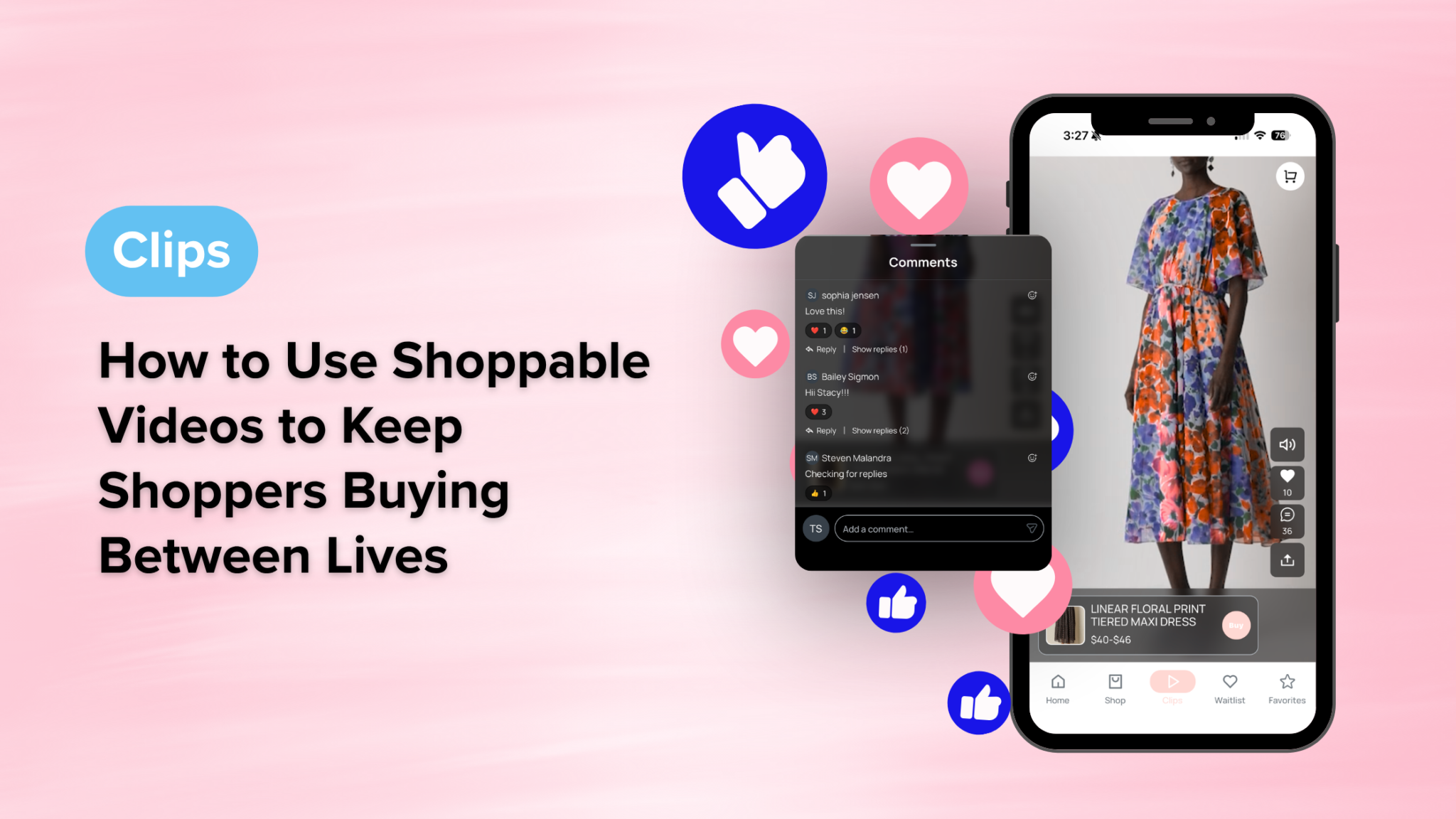
Shoppable videos change that. CommentSold’s Clips feature gives shoppers a TikTok-style feed on your branded mobile app and website, available 24/7 with zero ads and zero algorithm working against you. Shoppers scroll, tap a product, and add it to their cart without ever leaving the video. And with three different ways to build your Clips library, you don’t need to be a content machine to fill it.
What Is a Clip?
A Clip is a short, shoppable video (30 to 60 seconds) linked directly to the products featured in it. When a shopper watches a Clip on your mobile app, they can tap any tagged product, choose their size and color, and add it to cart in seconds. No navigating to a product page, no losing their place. Just a seamless path from “I love that” to “it’s in my cart.”
Clips live in two places on your CommentSold store:
- The Clips feed on your mobile app: a swipe-up feed, just like TikTok, where shoppers can browse all your Clips in one place
- Product detail pages: Clips appear directly on the product page (on both your app and website) so shoppers can see items styled and in motion before they buy
In addition, each Clip can be tagged with up to five products, making it easy to showcase full outfits, bundled looks, or complementary items in a single video.
3 Ways to Add Shoppable Videos to Your Store
The biggest reason retailers don’t use shoppable video? They assume they don’t have time to create it. Here’s the thing: you probably already have more content than you think.
1. AI ClipHero: Turn Your Live Replays Into a Content Library
If you go live, you’re already sitting on a goldmine of product content. AI ClipHero automatically generates dozens of professional, 30-to-45-second product clips from every live replay with one click.
Here’s how it works:
- After a live sale, go to AI Tools in your CommentSold dashboard
- Find your live replay and select Generate AI Clips
- Enter your notification email and hit Generate My Clips
- Once ready (as quick as 15 minutes), review each clip and Approve or Reject
- Download your approved clips and publish them as Clips on your store
The more you rate your clips, the smarter ClipHero gets, learning your preferences with every live. In fact, one live sale can yield dozens of ready-to-publish product clips, which means a full content calendar from a single show.
2. Upload a Video: Use What You Already Have
Already filming product content for social? Upload it directly. From your Clips tab in the CommentSold dashboard, select Create New Clip, then drag and drop your video file.
A few things to keep in mind:
- Videos must be .mp4 format and under 100MB
- 30 to 45 seconds is the sweet spot for engagement
- You can link up to 5 products per clip
- Choose whether the clip displays as a pop-out or inline on product pages
If you’re already shooting content for TikTok or Instagram, adding it as a Clip takes minutes. In other words, it’s the same video doing double the work.
3. Clips Import Engine: Pull Directly from Instagram & TikTok
This is where it gets really powerful. The Clips Import Engine lets you sync your Instagram Reels and TikTok videos directly into your CommentSold dashboard with no downloading, no re-uploading, and no starting from scratch.
Small retailers face real content fatigue. Manually saving videos from social platforms, converting file types, and re-uploading everything to your store is a high-friction process that most shops quietly abandon. Fortunately, the Import Engine eliminates that friction entirely.
You can also import a single video by URL. This is particularly useful for pulling in user-generated content from customers who’ve already tagged your products. That authentic content becomes shoppable in minutes.
How Shoppers Engage: Comments, Reactions & Sharing
Clips aren’t just a passive viewing experience. They’re a conversation starter. Shoppers on your mobile app can comment on Clips, react with emojis, and share videos to bring new customers into your ecosystem.
This matters more than it might seem. For example, when a shopper comments “obsessed with this dress 😍” and another customer sees that reaction, it’s social proof in real time. That’s the same pull that makes social shopping so effective, now on a platform you own and control.
From your dashboard, you have full control over the conversation:
- Reply to comments directly from the Comment Management tab
- Delete anything off-brand or inappropriate
- Block users if needed
- All deleted comments are retained on the backend, so you maintain full visibility
Shoppers can also delete their own comments, which keeps the experience feeling natural and low-pressure. Furthermore, since comments are mobile-only, customers browsing on the web can watch Clips but won’t see options to comment or react. That keeps the app experience distinct and worth coming back to.
Why Shoppable Videos Make Your Mobile App a Destination
Live selling builds your community, but it’s time-boxed. You can only go live so many hours a week. Clips extend that community energy into every hour your app is open.
Consider what happens when a first-time shopper downloads your app at 10pm on a Tuesday, long after your last live. Without Clips, they browse static product pages and leave. With Clips, however, they land in a scrollable, video-first feed that feels alive, watch someone style an outfit they love, and add it to cart in seconds.
That’s the difference between an app that drives one purchase and an app that builds a habit. Ultimately, habits are what turn first-time buyers into loyal customers who come back — not because you pushed a notification, but because your app is genuinely worth opening.
Clips by CommentSold consistently drive 3x more sales and 4x more engagement compared to static product pages. Moreover, with AI ClipHero, the Clips Import Engine, and manual uploads all working together, you can build a rich content library without adding a full-time content creator to your team.
Your lives are already doing the heavy lifting. Clips make sure that work keeps paying off long after you go offline.
Frequently Asked Questions
What is a Clip in CommentSold? A Clip is a short shoppable video (30 to 60 seconds) that can be tagged with up to five products. Shoppers can watch Clips on your branded mobile app’s Clips feed or directly on product pages, and add items to their cart without leaving the video.
How do I turn my Instagram Reels into shoppable Clips? The Clips Import Engine lets you connect your Instagram account and sync your Reels directly into your CommentSold dashboard. From there, you review videos, tag products, and publish them as shoppable Clips with no manual downloading or re-uploading required.
Can I use my live sale recordings to create Clips? Yes. AI ClipHero automatically generates dozens of product-specific short clips from any live replay with one click. You review and approve the clips, then publish them to your Clips feed. It’s one of the fastest ways to build your content library.
Do customers need the mobile app to watch Clips? No. Clips also appear on your website product pages. However, the full Clips feed experience (swipe-up browsing, comments, and reactions) is exclusive to your branded mobile app.
How many products can I tag in one Clip? You can tag up to five products per Clip. This makes Clips ideal for “shop the look” content, outfit roundups, or bundled product features that increase average order value.
Your App Should Work as Hard as You Do
The businesses winning right now aren’t just going live more. They’re keeping customers engaged in between. Clips give you a video-first, community-driven shopping experience on your branded app that keeps shoppers coming back whether you’re on camera or not.
If you’re ready to turn your mobile app into a destination your customers actually want to open,