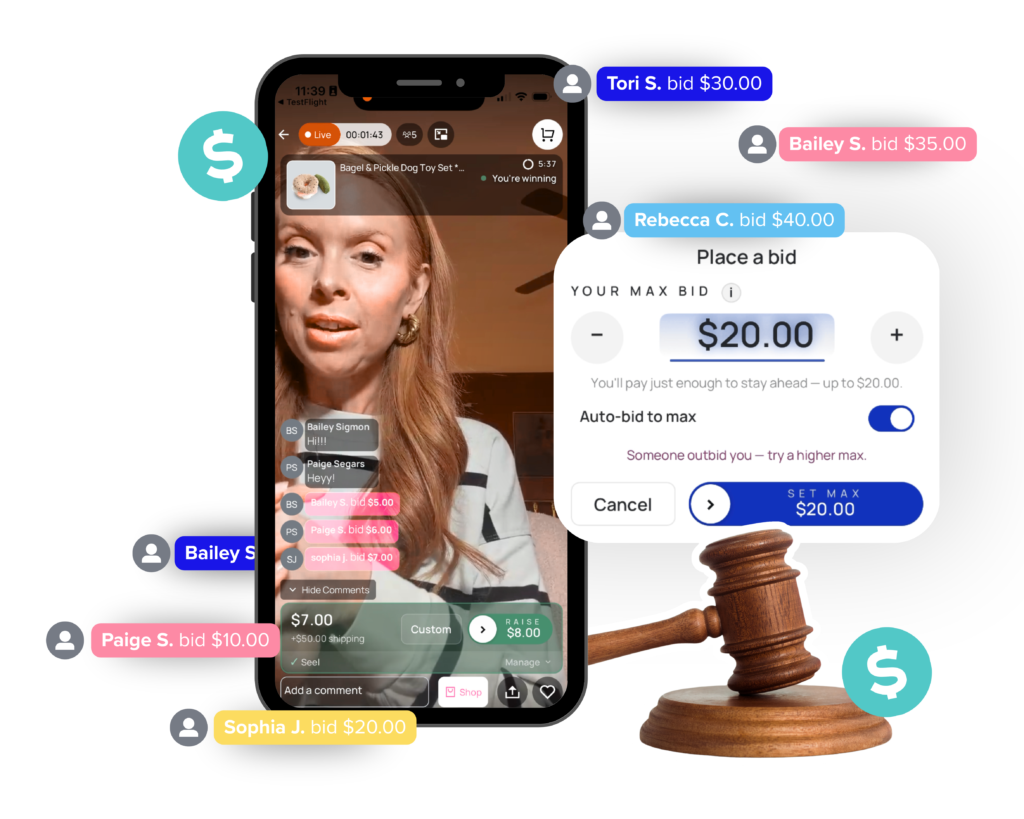
Live Auctions let your shoppers bid against each other in real time during your live shows. Prices climb, energy builds, and the winner is charged automatically when the timer ends.
You’re selling your most coveted items for list price, even when three people are competing for the same item in the comments.
You’re manually tracking bids in the comment section or paying high marketplace fees.
Shoppers are watching but don’t feel the urgency to buy, and you’re not sure how to change that.
Your most sought-after items create real excitement
Selling high-demand items at list price to the fastest commenter leaves money on the table. Your most coveted pieces create real excitement, and your shoppers want to be part of that moment.
Live Auctions on CommentSold let that excitement play out. Shoppers bid, prices climb, and when the timer hits zero, the winner is charged automatically. No manual tracking. No drama. Just the most electric selling moment you’ve ever had in a live.
Built into your dashboard
Everything you need. Nothing you don't.
Live Auctions run directly inside CommentSold. No new tools, no extra setup, no learning curve.
Launch Mid-Show in Seconds
Select any inventory item and hit Start Auction. No pre-configuration needed. CommentSold even suggests a starting bid based on the product price so you can get going fast.
Prices Go Up. Not Down.
As shoppers compete, the price climbs in real time. Your dashboard updates live with the current high bid, bidder name, total bids placed, and time remaining on the clock.
Automatic Checkout. Zero Follow-Up.
When the auction closes, the winning shopper’s saved payment method is charged instantly and they receive an order confirmation. No manual invoicing, no chasing payments.
Run as Many as You Want Per Show
One auction ends, you start another. Keep the energy going throughout your entire live with no cooldown period and no momentum lost between items.
Take Full Control at Any Time
End an auction early to declare an instant winner, or cancel it entirely to release all bids and inventory with no charge to anyone. You’re always in control of your show.
Pro tip
“Use Live Auctions as your closing moment. Give your most loyal shoppers something worth staying for, and watch your comment section come alive at the end of every show.”
The results speak for themselves
Simple by design
From live to bidding in under a minute.
Go Live
Start your live show on your CommentSold app or webstore as you normally would. No special setup required before you go on air.
Start the Auction
Choose the item you want to auction, set your starting bid and timer, and hit Start. CommentSold tracks all bids and updates your dashboard in real time.
Winner Is Charged
When the timer ends, the highest bidder is charged instantly and receives their order confirmation. Move straight to your next item, or your next auction.
See it in action
Here's what a Live Auction looks like in your show.
It's Tuesday night. You're 20 minutes into your live.
You’ve been saving your most unique item for the right moment. In the past, you’d post the price, someone would comment first, and the moment would be over in seconds. You’d always wonder if you left money on the table.
Tonight is different. You pull up the item, hit Start Auction, and set a two-minute timer. The bids start coming in almost immediately. Your dashboard is updating in real time: $85… $110… $140. Your comment section is alive. Shoppers are tagging friends. Viewers who were about to leave are now glued to their screens.
When the timer hits zero, the highest bidder wins. CommentSold charges them automatically and sends an order confirmation. You didn’t have to touch a thing.
The item sold for 2x what you would have listed it for, and your next live already has shoppers eagerly waiting for it.
Questions? We have answers.
Frequently Asked Questions
Do I need to set up products differently to run a Live Auction?
No. You can auction any available inventory item during your live. No special product setup or pre-configuration is required. Just go live, select your item, and start the auction.
What happens if no one bids?
If the auction ends without any bids, no charge is made and the inventory is released. You can move on to your next item or continue your show as normal.
Can I cancel an auction if something goes wrong?
Yes. Selecting Cancel Auction clears all existing bids, releases the reserved inventory, and ends the auction with no winner. No shoppers are charged.
Can I run more than one auction in a single live show?
Absolutely. Once one auction ends, you can immediately start another. Many sellers run multiple auctions per show to keep the energy high throughout the entire live.
What happens to auction bids if a shopper watches the replay?
Auction product overlays do not appear in live replays and bidding is disabled for replay viewers. Bid comments and auction-related messages will remain visible in the comment feed, but replay viewers cannot participate.
Your inventory has been waiting for this moment.
Start a free trial, and we’ll show you exactly how to run your first one.