You’ve seen it happen. Another women’s clothing shop goes live on a Tuesday night, holds up a new drop, and sells through most of it before the show wraps. Meanwhile, you’re left wondering what’s running behind the scenes to make it look so easy.
The answer is rarely a single trick. Instead, it’s a complete setup: live selling software that captures every “sold” comment, sends the invoice, and keeps sizes accurate without a spreadsheet. Below, you’ll see the layers most clothing sellers run on, why so many of them consolidate into one platform, and how to set up your own first live sale.
What Live Selling Software Does for Clothing Sellers
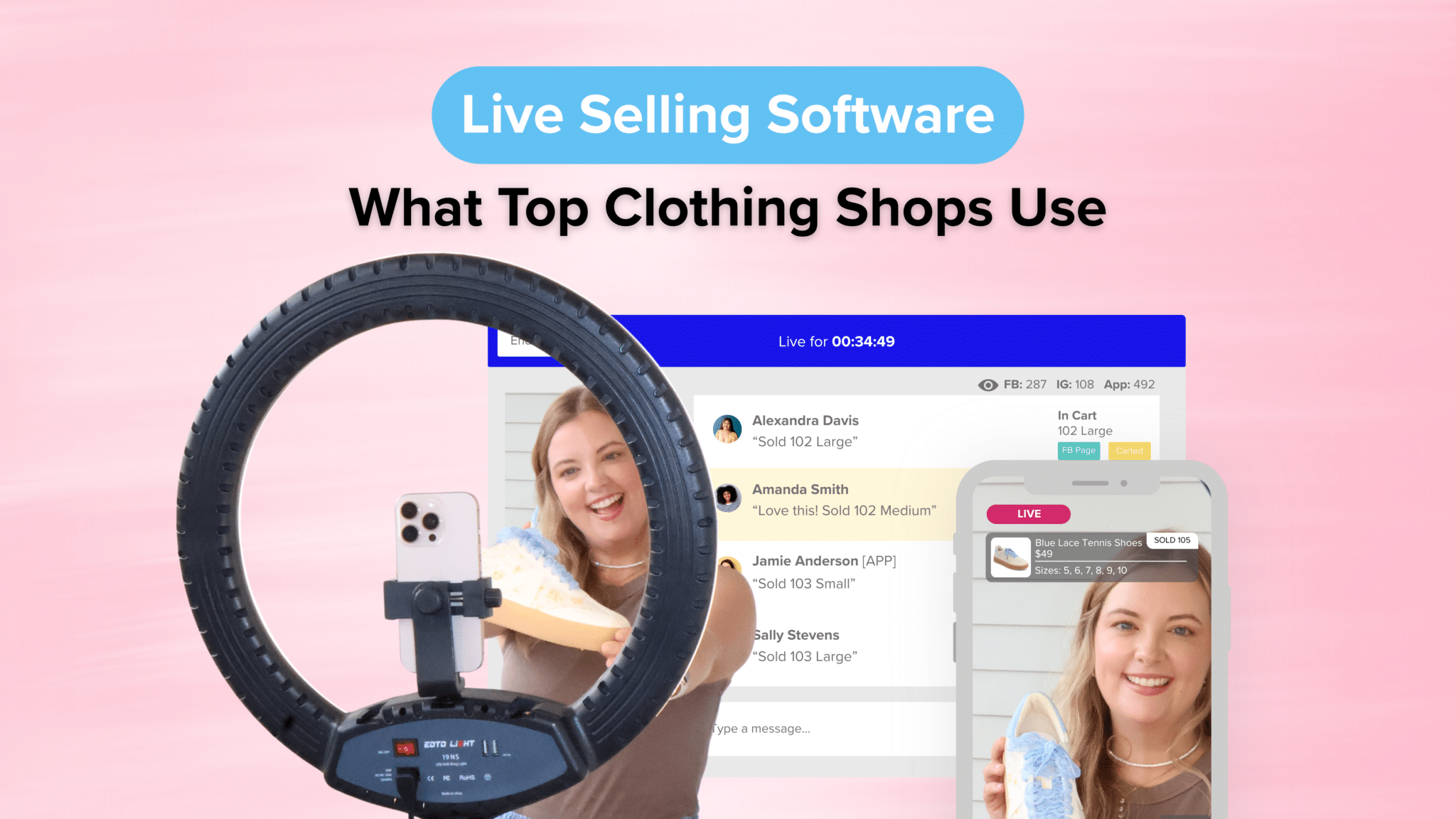
Live selling software connects your livestream to your inventory and checkout, so a shopper’s comment turns into a cart, an invoice, and an order automatically. In other words, you sell on camera and the software handles everything after “sold.”
That matters more for clothing than almost any other category. A single top might come in five sizes and three colors, which means one item on camera is really 15 separate pieces of inventory. Without software, every comment like “sold, medium, sage” has to be matched by hand, and the last medium is usually where mistakes happen.
The payoff for getting it right is real. In fact, McKinsey’s research on live commerce found that companies report live selling conversion rates approaching 30%, up to ten times higher than conventional ecommerce. Strong conversion only helps, though, if your back end can keep up with the comments.
The Live Sale Tools in a Typical Setup
Most women’s clothing sellers run their live sales on six layers of live sale tools. Some use a separate app for each one, while others get all six from a single platform. Either way, here’s what the setup includes:
- A camera and a stream. For most shops, this is simply a phone on a tripod with a ring light. From there, many shops stream to their Facebook page, Instagram, TikTok, website, and branded app at the same time, so shoppers can watch wherever they already spend time.
- Comment-to-cart. This layer reads comments like “sold 214 medium” and drops the right size and color into the right shopper’s cart while you keep talking.
- Automated invoicing. Each shopper gets a checkout link within seconds of commenting, so nobody has to send payment requests by hand after the show.
- Inventory sync. Every claim updates stock in real time, so the last medium can’t be sold twice across Facebook, your website, and your app.
- Waitlists. Once a size sells out, the next “sold” comment lands on a waitlist instead of getting lost in the feed.
- A branded app and replays. Shoppers who missed the live can shop the replay later, and push notifications remind your regulars when you’re going live next.
The first layer is the easy part. As a result, the real difference between a calm live sale and a chaotic one usually comes down to layers two through five.
Why Clothing Sellers Consolidate Into One Live Selling Software Platform
Many clothing sellers start with a patchwork: Facebook for streaming, a spreadsheet for claims, a payment app for invoices, and a separate website. That works for a few shows. However, it starts to break down once you’re selling 40 styles in an hour.
Here’s what a patchwork tends to cost you:
- Oversold sizes when your website and your live don’t share inventory
- Missed sales when invoices go out hours after the comment
- Monthly fees that add up across several subscriptions
- Hours of post-show data entry instead of packing orders
That’s why so many shops eventually move to all-in-one live selling software. One platform means one inventory count, one checkout, and one customer list. For example, CommentSold lets you stream to your Facebook page, Instagram, TikTok, website, and branded app at the same time, with every comment feeding the same carts and stock.
Consolidating also keeps you ready for whatever Facebook adds next. In June 2026, Meta expanded Live Video Ads and Live Shopping Tools and is working with U.S. live commerce platforms, including CommentSold, to turn livestreams into ads. A connected platform lets you use updates like that without rebuilding your setup.
Comparing platforms side by side? Our guide on [how to choose the best live selling app for Facebook](link to: best live selling app for Facebook sellers post) covers what to ask in a demo.
How to Set Up Your First Live Sale
Setting up your first live sale takes less work than most sellers expect. Once your live selling software is in place, follow these steps:
- Connect your channels. Start with your Facebook page, then add Instagram, TikTok, your website, or your app so one live reaches all of them. Keep in mind that Instagram requires business accounts to have 1,000 followers to go live.
- Load every size and color. Add each variant before the show, so every claim matches real inventory.
- Pin your shopping instructions. Post a short how-to with what to comment, where to check out, and your return policy.
- Plan your run of show. Line up your pieces in order, with a best seller early to build momentum and new arrivals in the middle.
- Go live and teach as you sell. Spend the first minute explaining how to comment to buy, then remind newcomers every so often.
- Follow up after the show. Share the replay, and let automated reminders nudge anyone who hasn’t checked out.
After two or three shows, the routine starts to feel natural. Better yet, your regulars will know exactly how to shop, which makes every live run more smoothly.
Frequently Asked Questions
What software do women’s clothing shops use for live sales?
Most use live selling software that handles comment-to-cart, automated invoicing, and real-time inventory in one place. Many also add a branded mobile app so shoppers can watch, shop replays, and get notified before each show.
What do I need to start live selling clothes?
You need a phone, a tripod, decent lighting, a Facebook page that meets Facebook’s go-live requirements, and software to capture sales. Load your sizes and colors before your first show so every claim matches your stock.
Can I run a live sale from my phone?
Yes. Most clothing sellers go live from a phone on a tripod. With CommentSold, for example, you can go live using the CommentSold Admin app on iOS or Android.
Can I run a live sale in a Facebook group?
Not with comment-to-cart software. Meta removed third-party access to Facebook groups in April 2024, so selling tools can no longer read group comments. Instead, most sellers go live on their Facebook page, share the link in their group, and invite VIP shoppers to shop through their app or website.
Sell Your Next Drop With Less Scrambling
The shops you watch selling out in 20 minutes aren’t working harder on camera. Instead, their live selling software is doing the follow-up, so they can focus on styling, chatting, and building a community that keeps coming back.
If you’re ready to run live sales like the shops you admire, see how CommentSold works for women’s clothing retailers →