
Right now, your order confirmation page is probably a dead end. A shopper clicks “Buy,” lands on a plain thank-you screen, and closes the tab. That moment of peak engagement, when a customer is happiest and most trusting, slips away without earning you a cent. For growth-minded shops, that adds up to real passive revenue left on the table every single day.
There’s a smarter way to use that space. With the new Disco Aftersale Integration inside CommentSold, you can turn your thank-you and order-status pages into a fresh passive revenue stream, without touching your checkout flow or spending a dime to start. In other words, the traffic you already generate can start paying you back.
What Is the Disco Aftersale Integration?
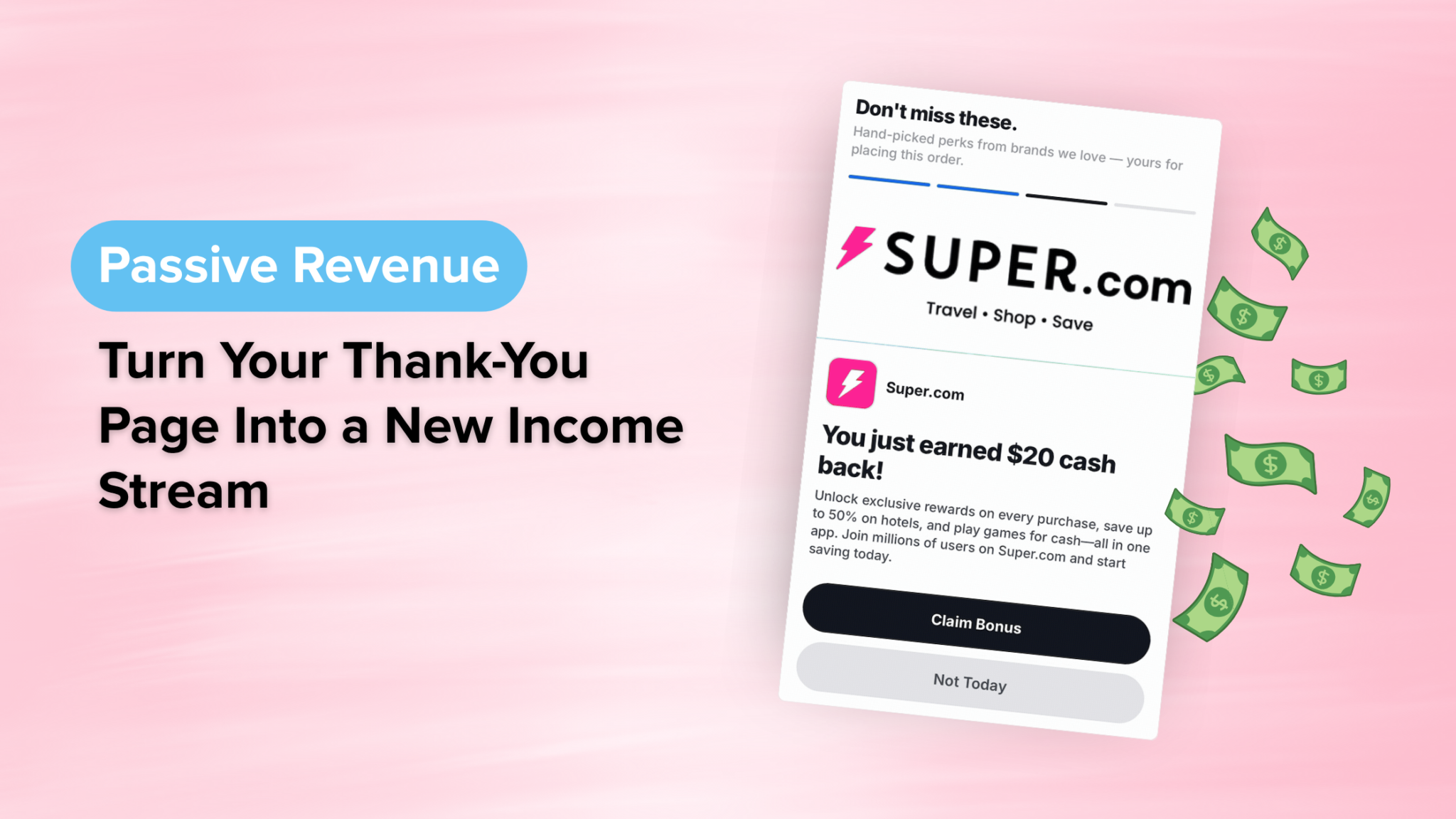
The Disco Aftersale Integration is a tool that displays curated offers from complementary, non-competing brands on your thank-you and order pages after a customer completes a purchase. Every time a shopper engages with one of those offers, you earn revenue.
Think of it as commerce media for independent retailers. Historically, this kind of “retail media” has only been available to the biggest retailers, the ones with dedicated ad-tech teams and advertiser relationships. Disco hands that same model to small and mid-size shops, fully built and ready to go. As a result, you get a credible new revenue stream without becoming a media company.
Here’s why shop owners are drawn to it:
- Profit from day one. There’s no cost to use the integration, so any engagement is upside.
- Zero disruption. Offers only appear after checkout is complete, so your shopping experience stays clean.
- Set it and forget it. You pick the categories that describe your shop, and Disco curates the offers from there.
- Built-in tracking. You monitor everything inside your CommentSold Admin under Reports > Disco.
Will Partner Offers Disrupt My Checkout?
No. This is the question most sellers ask first, and the answer matters. Disco widgets appear only after a transaction is finished, so your customers are never distracted while they’re buying from you. The most important part of your app and website, your checkout flow, stays exactly as it is.
You also stay in control of the vibe. During setup, you choose a primary category and at least one subcategory that best describe what your shop sells. Disco then uses those categories to curate complementary, non-competing offers. In practice, that means you’re giving loyal shoppers relevant recommendations, not pushing them toward competitors. Because the experience is contextual, it tends to feel like a helpful add-on rather than an ad.
How Much Can You Actually Earn?
Passive revenue only matters if the numbers work, so consider the performance across Disco’s network. Offers closely aligned with shopper interests have generated click-through rates around 5%, with conversion rates reaching 10% or more. Better yet, that’s happening on traffic you’re already earning, which means the revenue is incremental rather than something you have to chase.
For a shop processing hundreds or thousands of orders a month, those percentages compound quickly. Additionally, because payouts are handled monthly through a connected Stripe account, the earnings flow in without any extra admin work on your part. That’s the appeal of a true set-it-and-forget-it revenue stream: it works quietly in the background while you focus on what you do best, which is selling.
How to Set Up Disco in CommentSold
Getting started takes just a few minutes. Follow these steps inside your CommentSold Admin:
- Navigate to Setup > Integrations > Disco.
- Choose the product categories that best describe your shop. Make sure you love your primary category, because it cannot be changed later.
- Connect a Stripe account so your monthly payouts have somewhere to land.
- Review and accept the Disco partner terms.
- Toggle the integration on.
Once you flip it on, your account will show a “Pending” status while your publisher approval syncs. After you’re approved, your widgets automatically go live, so there’s nothing else to build or manage. From there, you can watch performance anytime under Reports > Disco. It really is that hands-off.
Frequently Asked Questions
What is the Disco Aftersale Integration? It’s a CommentSold integration that shows curated offers from complementary brands on your thank-you and order pages after a customer checks out. When shoppers engage with those offers, you earn revenue. There’s no cost to use it, and it doesn’t interrupt your checkout flow.
Does it cost anything to use Disco? No. The integration is free to enable, and profit starts from day one. You only need to connect a Stripe account so that Disco can send your monthly payouts.
Will my customers see competing brands? No. You select the categories that describe your shop, and Disco uses them to curate complementary, non-competing offers. That way, your customers get relevant recommendations instead of a nudge toward a competitor.
When will I get paid? Payouts happen monthly through your connected Stripe account. For shops enabling it now, the first payouts begin at the end of August.
Where do I track my results? Everything lives inside your CommentSold Admin under Reports > Disco, so you don’t have to log into a separate third-party dashboard to see how you’re performing.
Turn Your Dead-End Pages Into Passive Revenue
Your thank-you page is doing nothing right now. Fortunately, that’s an easy fix. With the Disco Aftersale Integration, you can monetize the traffic you already have, keep your checkout experience pristine, and start earning from a page that used to just say “thanks.”