You picked an app platform because it promised live shopping. Then you went live and found out what that really meant: a video player sitting inside your app, while shoppers still had to leave, find the item, and check out on their own. By the time they got there, the piece was gone. Worse, so were they.
Here’s the truth. Plenty of platforms say they support live, but far fewer offer a true live selling app, where shoppers watch, claim, and pay without ever leaving your brand. Fortunately, the difference is easy to spot once you know what to look for. Below, you’ll find the features that matter, the red flags to skip, and the questions to ask before you commit.
What Is a Live Selling App?
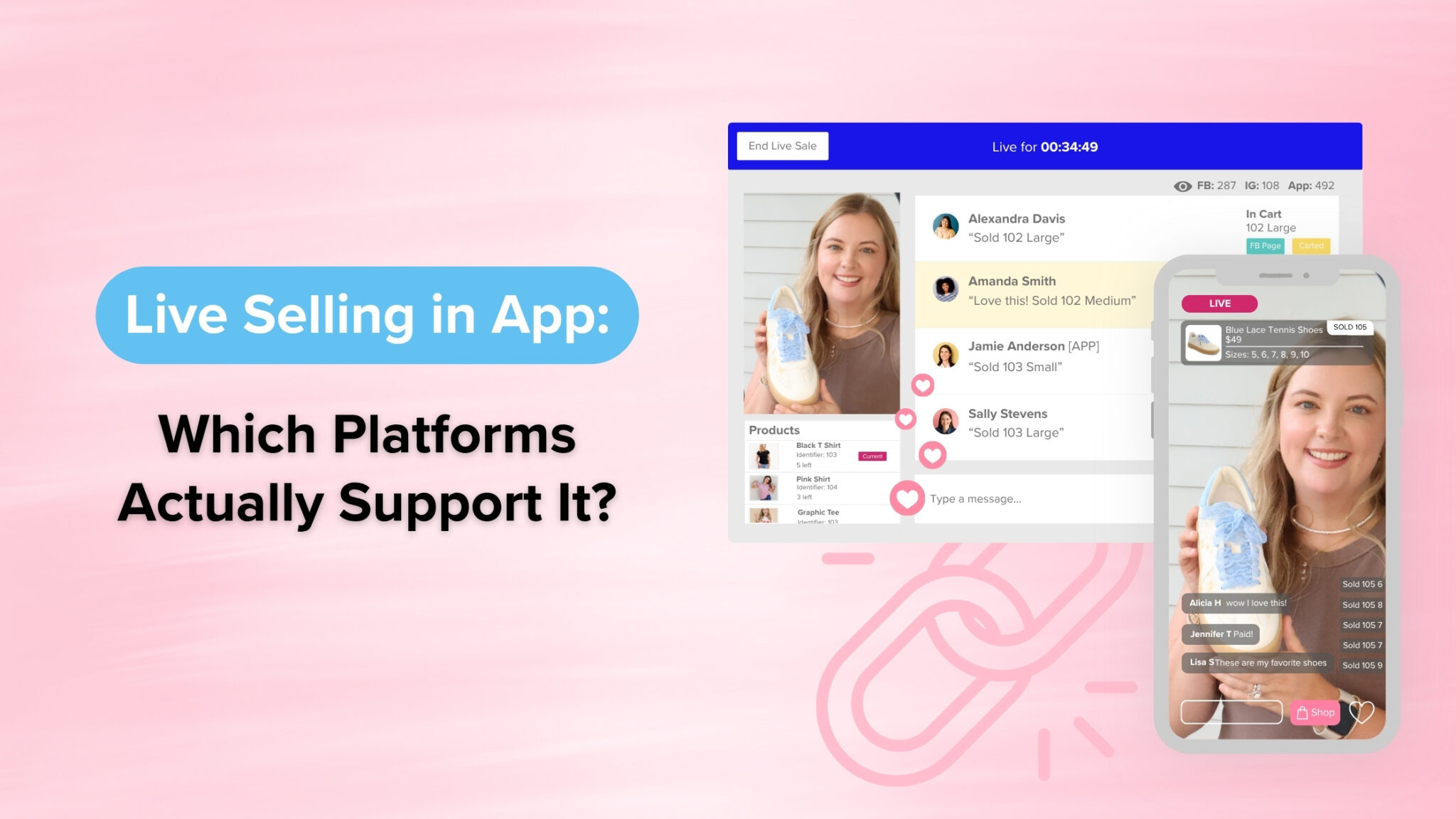
A live selling app is a mobile app where shoppers watch you sell in real time and buy what you show without leaving the stream. In other words, the video, the cart, and the checkout all live in one place.
That last part is what separates selling live from simply streaming live. Many apps can play a video. However, a true live selling platform connects that video to your inventory, so every claim updates stock instantly and every order lands where it should.
Why does that matter? Because live selling converts. Shops that sell live see conversion rates between 9% and 30%, compared to just 2–3% on a traditional storefront. McKinsey’s research on live commerce points to the same pattern, with live shopping converting at many times the rate of conventional ecommerce. As a result, the platform you choose decides how much of that lift you actually keep.
5 Features Every Live Selling App Needs
To actually sell live, an app needs native video, instant claiming, synced inventory, automated checkout, and a way to bring shoppers back. Here’s what each one looks like in practice.
- Native live video inside your branded app. Shoppers should watch your live right inside your app, under your logo. If the live button opens Facebook or YouTube instead, you’re sending your buyers to someone else’s platform.
- Comment-to-cart or instant claiming. When a shopper types “sold” or taps claim, the item should drop straight into their cart. No DMs, no spreadsheets, no chasing.
- Real-time inventory sync. Your stock should update across your app, website, and social channels the second something sells. Otherwise, you’ll oversell your best pieces and spend the next morning issuing refunds.
- Automated invoicing and fast checkout. Look for [automated invoicing](link to: CommentSold Automated Invoicing feature page) and saved payment details. Every extra step between “I want it” and “paid” costs you sales.
- Push notifications and shoppable replays. A great live sale starts before you hit Go. Push notifications tell app shoppers the moment you’re on, and shoppable replays keep selling long after you sign off.
If a platform checks only two or three of these boxes, it’s a video tool with a store attached, not a live selling app.
Live Video Plugin vs. a Real Live Selling Platform
A plugin adds video to your app, while a real live selling platform adds selling. These red flags tell you which one you’re looking at:
- The live button links out. If shoppers tap and land on Facebook, Instagram, or YouTube, the app is a doorway, not a destination.
- Claims happen in comments you read by hand. Consequently, someone on your team is copying names into a spreadsheet during every show.
- Inventory updates after the show. That gap is exactly where overselling happens.
- Checkout requires a separate link. Each handoff gives shoppers another chance to change their mind.
- You need three or four add-ons to make it work. For example, one tool for video, another for invoicing, and a third for notifications. Plus, each one has its own fee and its own way to break.
Plugins aren’t useless. In fact, they’re a fine starting point if you only go live once in a while. If live is a real revenue channel for your shop, though, stitching tools together usually costs more time than it saves.
How to Choose a Live Selling App for Your Shop
The right live selling app keeps shoppers inside your brand from the first notification to the final payment. Bring these questions to any demo to find out fast:
- Can my shoppers watch and buy live inside my own branded app?
- What happens, step by step, when a shopper claims an item?
- Does inventory sync instantly across my app, website, and social channels?
- Are invoices sent automatically, or does my team send them?
- Can I notify app shoppers the moment I go live?
- Do replays stay shoppable after the show ends?
- How many separate tools will I need to run one live sale?
This is where an all-in-one platform earns its keep. With CommentSold, your branded mobile app, live selling, and automated invoicing run on one system. That means a claim during your live updates inventory and lands in the shopper’s cart instantly.
Better yet, [push notifications](link to: blog on push notification strategy for sellers) pull your most loyal buyers into the stream the moment you start. That matters, since 60% of first-time mobile app shoppers return to buy again. Ultimately, the goal isn’t just to go live. Instead, it’s to build a place your shoppers come back to, week after week.
Frequently Asked Questions
Can I go live inside my own branded app? Yes, but only on platforms built for it. Many app builders embed or link to a third-party stream, while a true live selling app lets shoppers watch, claim, and check out without leaving your app. Ask any provider to walk you through the full flow, from notification to payment.
Is selling live in an app better than Facebook Live? Both work, and many sellers use them together. Social lives are great for reach. Your own app, on the other hand, gives you a direct line to loyal shoppers through push notifications, with no algorithm deciding who sees you.
Do shoppers have to download an app to buy during a live sale? Not always, since many sellers go live on social and their website too. That said, app shoppers tend to be your most engaged buyers. So it’s worth giving them a reason to download, like early access or app-only deals.
Can I add live selling if my store is on Shopify? Yes. Some live selling platforms connect to an existing Shopify store, so you can add live sales and a branded app without rebuilding. Before you commit, confirm that inventory and orders sync both ways.
How do customers check out during a live sale? On a full live selling platform, shoppers claim an item by commenting or tapping, and it goes straight into their cart. From there, they pay through an automated invoice or a quick in-app checkout. The fewer steps, the more claims turn into paid orders.
Sell Live Where Your Shoppers Already Are
Choosing a live selling app is really about choosing where your customer relationships live. When video, claiming, inventory, and checkout work together, you spend less time chasing orders and more time building the shop you actually want.
If you’re ready to turn every live into a sale, and every buyer into a regular, see how CommentSold works →