
You’re live. You’re showcasing products, answering comments, calling out sizes, reminding people about your shipping policy, and trying to keep the energy up — all at the same time. It’s a lot. And while you’re juggling it all, there’s a good chance your viewers are missing half of what you’re saying.
That missed information — a promo code, a shipping cutoff, a restock announcement — is often the difference between a viewer who buys and one who keeps scrolling. Live selling tips for boutiques tend to focus on energy, lighting, and product presentation. But one of the simplest conversion tools most shops aren’t using to its full potential is already built in: the Live Info Banner.
Why Shoppers Miss Key Info During Your Lives
The short answer: live selling moves fast, and important details get buried in the comment stream, talked over, or missed entirely by viewers who join mid-stream.
Think about how your average viewer experiences your live. They jump in five minutes late. The comments are moving fast. You’re mid-item. They don’t know if shipping is free, whether the discount code is still active, or when the sale ends. So instead of buying, they wait — hoping you’ll repeat the important stuff — or they leave.
Repeating yourself constantly interrupts your flow and breaks the energy of the live. But staying silent means key information never lands. It’s a frustrating middle ground that costs you sales you should have closed — and it’s one of the most common live selling mistakes boutiques make without realizing it.
What the Live Info Banner Does (And Why It Works)
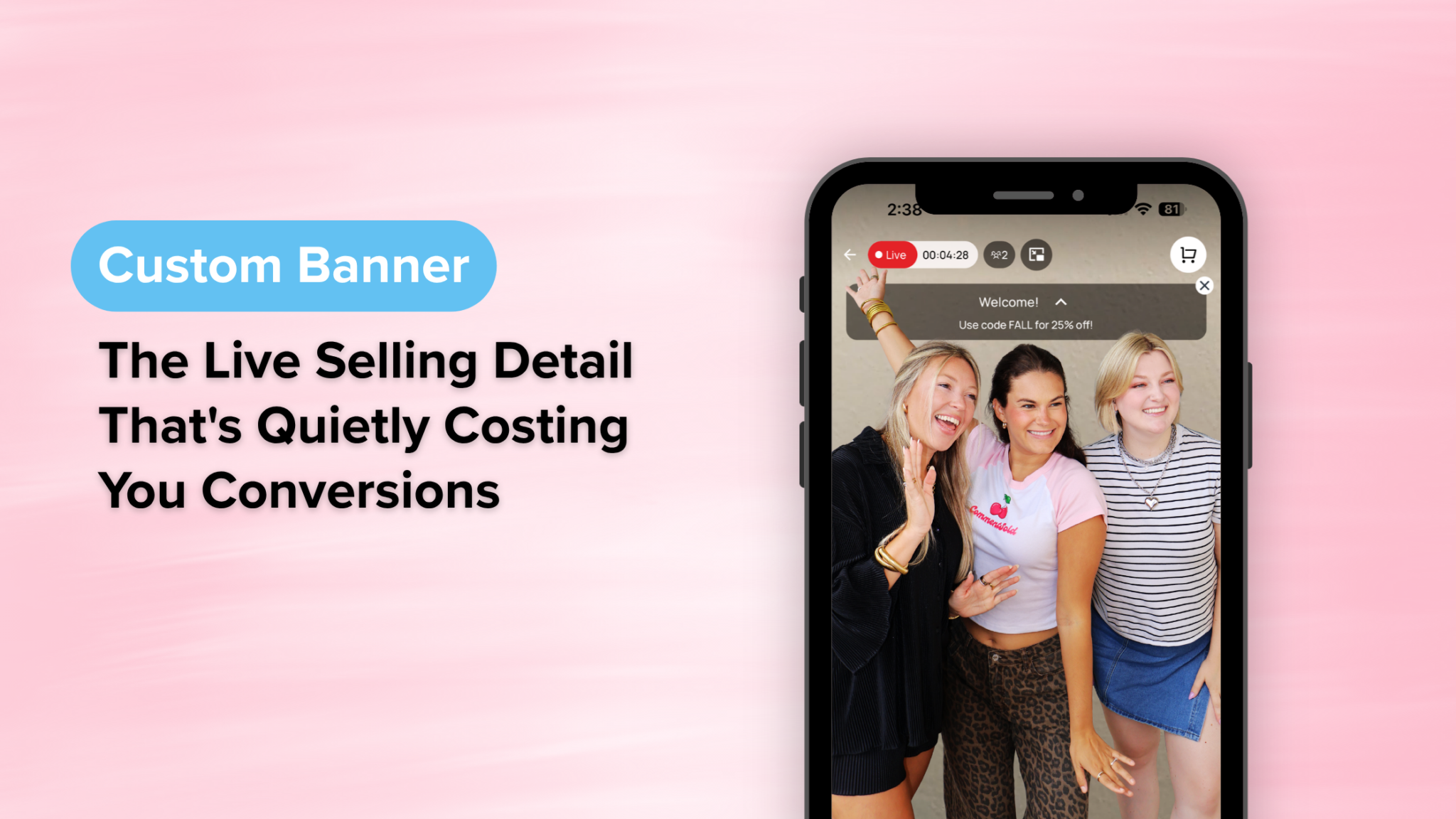
The Live Info Banner overlays scrolling text directly on your live video — visible to every viewer, the entire time, without you having to say a word.
While you’re focused on presenting products and connecting with your audience, the banner handles the background work: keeping your most important messaging front and center for anyone watching. New viewer who just joined? They can see exactly what’s happening without asking. Shopper on the fence? The promo code is right there on screen.
It works because it removes the dependency on timing. In a live sale, the right information needs to reach the right viewer at the right moment — and you can’t control when someone tunes in. A persistent, scrolling banner means your message is always visible, always working, regardless of where you are in the live.
The result: a smoother experience for your shoppers and fewer interruptions for you.
What to Put in Your Banner to Drive More Sales
The banner is only as powerful as what you put in it — and the best-performing banners are short, specific, and directly tied to buying decisions.
A few high-impact ways boutiques are using it:
- Promo codes and discount reminders. If you’re running a live-only deal, keep the code scrolling so no one misses it — especially late joiners.
- Shipping info and cutoffs. “Free shipping on orders over $75” or “Order by 3pm for same-day processing” answers the question before it gets asked.
- Restock and waitlist announcements. Building hype for something coming back in stock? Let the banner tease it while you keep selling.
- Return policy reminders. If you’ve enabled Seel or Redo return coverage, a simple “Shop worry-free — return coverage available at checkout” scrolling on screen can push hesitant viewers over the line.
- Event info. Upcoming live dates, start time reminders, or exclusive member-only access details keep your most engaged shoppers in the loop.
The key is keeping it concise. Short, punchy lines scroll better and get read. Think billboard, not paragraph.
New Updates: Now on Your Website and With Co-Hosts
The Live Info Banner now works across your website, mobile app, and multisource co-hosted lives — so your messaging stays consistent no matter where or how shoppers are watching.
Two updates make the banner more powerful than ever.
First, the banner now works on your website in addition to your mobile app. That consistency matters — whether a shopper is tuning in through your branded app or browsing your site, your promo, your policy, and your announcement are right there on screen.
Second, the banner now supports multisource co-hosts. Even when you’re running a collaborative live with another seller, your info banner stays active and on brand throughout.
And here’s a strategy worth building into your next live: use the banner to drive mobile app downloads. Add a line like “Download our app for the best live shopping experience” and mention it once or twice out loud. Shoppers who are already engaged and watching are your most likely converts — and 60% of first-time app shoppers return to buy again, making every download an investment in long-term revenue.
Frequently Asked Questions
What is the Live Info Banner in live selling? The Live Info Banner is a scrolling text overlay that appears directly on your live video during a sale. It lets you display key information — promo codes, shipping details, return policies, event announcements — to every viewer automatically, without interrupting your presentation to repeat it out loud.
What should I put in my Live Info Banner? The most effective banners include information that directly affects buying decisions: active promo codes, shipping thresholds or cutoffs, return coverage reminders, and upcoming live dates. Keep each line short and punchy — think billboard copy, not sentences. Rotate through 3–5 messages for maximum impact without overwhelming the viewer.
Does the Live Info Banner work if viewers are watching on my website instead of the app? Yes. The Live Info Banner now displays across both your mobile app and your website, so every viewer sees the same messaging regardless of where they’re tuning in.
Can I use the Live Info Banner during a co-hosted live? Yes. The banner now supports multisource co-hosts, so your messaging stays visible and on brand even when you’re running a collaborative live with another seller.
Make Every Second of Your Live Work Harder
The best live sellers aren’t just entertaining — they’re strategic. Every element of the viewing experience is working to move a shopper from curious to committed.
The Live Info Banner is a small addition with a compounding effect. Set it up once, keep it updated, and let it handle the details while you focus on what you do best. Paired with tools like return coverage, customer segmentation, and a branded mobile app, every live becomes a full conversion engine — not just a content moment.