
It’s 11:45pm. Your flash sale starts at midnight. You’re sitting at your laptop, coffee going cold, waiting to manually update your product listings so everything looks right when your promotion goes live. Sound familiar?
For business owners running frequent sales, limited-time drops, and collection-specific promos, this kind of manual upkeep is just part of the job — or at least it used to be. Scheduled product promotion tools for online sellers have changed what’s possible: your promotions can now go live and wrap up automatically, exactly when you planned, without you lifting a finger.
The Hidden Time Cost of Running Promotions Manually
The short answer: every manual step in your promotion process is an opportunity for something to go wrong — and the time cost adds up faster than most sellers realize.
Promotions are one of the highest-leverage tools a seller has. A well-timed flash sale, a coupon code drop, an exclusive collection launch — these drive urgency, reward loyal shoppers, and move inventory fast. But the operational side of running them quietly eats into the time you should be spending on growth.
Think about everything that goes into a single promotion:
- Updating product listings to reflect the sale
- Adding badge text to flag the right items at the right time
- Making sure messaging goes live at exactly the right moment
- Reversing all of it manually when the promotion ends
Every extra step is another opportunity for something to slip. A badge that goes up late. A coupon code that stays live past the deadline. A promotion that looks sloppy because the timing was off. Manual processes don’t just cost time — they cost credibility.
What Custom Badge Scheduling Actually Does
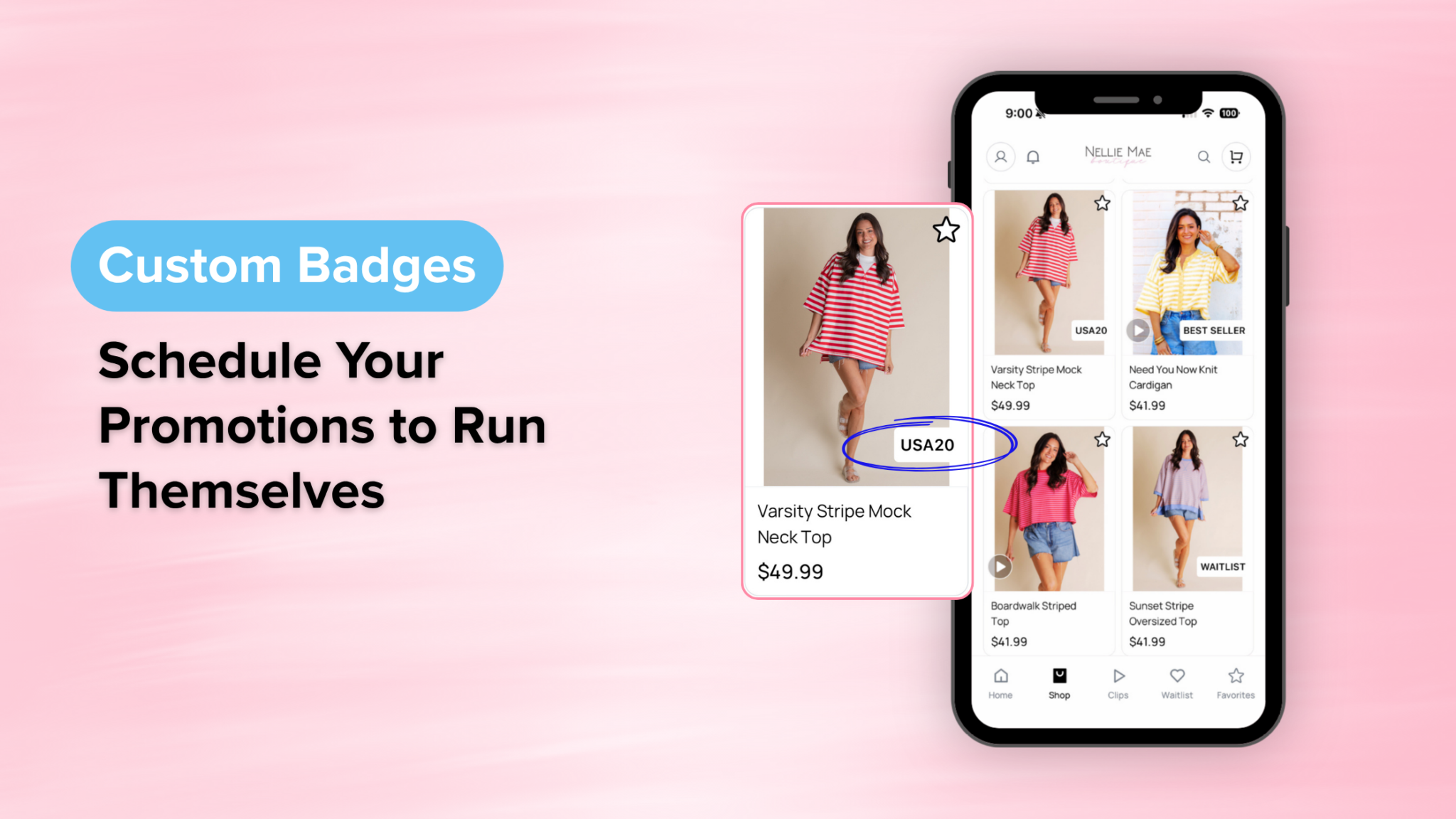
Custom badge scheduling lets you set a start and end time for the promotional text on your product listings — so your messaging goes live and expires automatically, perfectly synced with your promotion.
Running a 24-hour flash sale? Schedule your badge to appear the moment the sale starts and disappear the moment it ends. Promoting a coupon code for a specific collection? Set the badge text, pick your window, and let the platform handle the rest.
No midnight check-ins. No manual cleanup. No risk of outdated messaging lingering on your storefront after a promo wraps.
It’s a small feature with a significant impact on how polished and professional your shop looks — and how much mental energy you spend keeping it that way. The promotion runs exactly as planned whether you’re at your desk, on a live, or asleep.
Smart Ways to Use Scheduled Badges in Your Shop
The most effective sellers pair scheduled badges with their broader promotion calendar so every touchpoint — listings, push notifications, social posts, live sales — tells the same story at the same time.
A few high-impact ways to put them to work:
- Flash sale callouts. “24-Hour Sale” or “Today Only” badges create urgency at the product level — right where the buying decision happens.
- Coupon code reminders. Badge relevant products with the active code so shoppers see it while browsing, not just in an email they may have missed.
- Collection highlights. Launching a new arrivals drop or a seasonal collection? Badge those products to draw the eye and signal that something worth looking at is happening.
- Limited inventory alerts. “Almost Gone” or “Selling Fast” badges on low-stock items nudge hesitant shoppers toward a faster decision.
- Promotion end reminders. “Last Day” or “Ends Tonight” badges create a closing urgency that drives purchases from shoppers who’ve been browsing but haven’t committed.
The key is setting your badge schedule at the same time you plan the rest of your promotion — so everything launches and closes together without any manual intervention.
Frequently Asked Questions
What is custom badge scheduling for online sellers? Custom badge scheduling is a product management tool that lets you set specific start and end times for the text labels that appear on your product listings — like “Flash Sale,” “Today Only,” or an active coupon code. Instead of manually updating listings each time a promotion starts or ends, the badge text goes live and expires automatically on the schedule you set.
Can I schedule different badges for different products at the same time? Yes. You can set different badge text and different timing windows for different products or collections simultaneously — so a flash sale badge on one collection can run at a different time than a “New Arrivals” badge on another, all without manual updates.
How does badge scheduling help with live selling? When your product listings are already badged with accurate, timely promotional information before you go live, shoppers who visit your store mid-live see exactly what’s happening without you having to repeat it. Pairing scheduled badges with your Live Info Banner means your promotional messaging is consistent across every surface — your video, your listings, and your storefront.
Does scheduling badges work for final sale or clearance items? Yes — and it’s one of the most effective uses. Scheduling a “Final Sale” or “Clearance” badge with a defined end window creates natural urgency without you manually managing it. When the window closes, the badge disappears automatically, keeping your storefront clean and current.
One Less Thing at Midnight
The sellers that scale aren’t necessarily working more hours — they’re removing the tasks that don’t need a human touch. Scheduling your product badges is exactly that kind of win: a few minutes of setup that pays off every time a promotion runs without you having to babysit it.
When your store updates itself, you get to focus on the parts of your business that actually need you — connecting with customers, planning your next live, building the relationships that drive repeat sales. That’s what working smarter looks like in practice.
Ready to Stop Managing Your Store Manually?
CommentSold gives business owners the tools to run a polished, professional shop without the late nights and manual upkeep. From scheduled product badges to automated invoicing, live selling, and a branded mobile app — everything you need to grow is in one place.
See how CommentSold works and what it could do for your shop.